

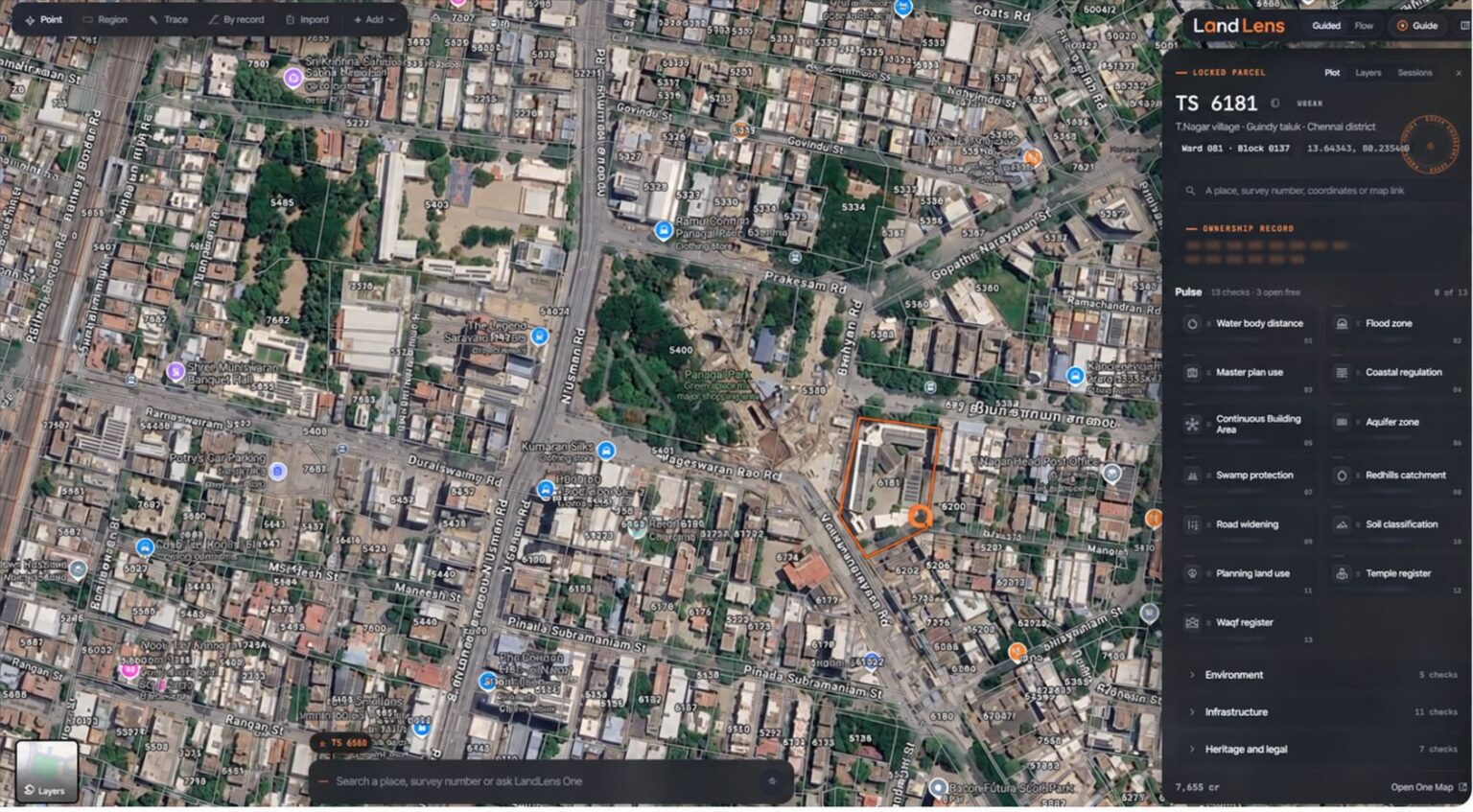
Finding a property on Google Maps is easy, but identifying its survey number, understanding its boundaries and accessing the corresponding land records can be challenging. LandLens aims to bridge this gap by integrating land-record search and verification features with Google Maps and Google Earth through a Chrome browser extension.
This integration allows users to explore available survey boundaries, access property-related information and conduct multiple verification checks within a connected mapping workflow.
Integrating LandLens with Google Maps
LandLens is designed to work through a Chrome extension that adds land-related search and verification features to Google Maps and Google Earth.
The initial setup, as described in the supplied instructions, involves the following steps:
- Install the extension: Open the Chrome Web Store, search for LandLens for Google Maps and Earth, and add the extension to Chrome after checking its publisher and permissions.
- Open Google Maps: Visit Google Maps in Chrome. A guided tour appears, if supported by the installed version.
- Connect to LandLens: Sign in and approve the requested connection or permissions if prompted.
- Start searching: Use the available LandLens features within Google Maps to search for a property and access supported land-record tools.
- Explore Google Earth: The demonstration also describes using LandLens with Google Earth, including viewing survey lines from a tilted perspective.
LandLens adds land-related search and verification features to the familiar Google Maps interface. You can search for a property using details such as its address, district, taluk, village, patta information or survey number.
The integration is designed to connect three important elements:
- Google Maps: Helps users visualise the location through maps and satellite imagery.
- Land survey information: Displays available cadastral boundaries and helps identify the relevant survey parcel.
- LandLens verification tools: Provides access to available land records and property-related checks.
LandLens Features Accessible Through Google Maps and Google Earth
With the LandLens Chrome extension integrated into Google Maps and Google Earth, users can access supported property-search and land-verification features directly through the mapping interface. This brings property identification, survey visualisation and land-record investigation into a more connected workflow, reducing the need to switch between separate platforms for every step.
Search for Properties by Address, Location, Land details or Survey Details
Search for a property as usual on Google Maps, and LandLens displays the available land records directly in Google’s place card, without requiring you to drop a pin. You can search by patta, district, taluk, village or survey number, measure an area by drawing on the map, explore 33 map layers, or ask LandLens One a question with the selected property details attached.
For example, a buyer searching for Survey No. 125/2 in Chengalpattu can identify the corresponding parcel on Google Maps, where available, and access related land information. If the survey has subdivisions, the correct parcel must be selected.
When a land survey number has been split or subdivided, the LandLens system is designed to help you identify the specific portion you are interested in.
When you click on a plot that contains a subdivision, LandLens will prompt you to select the specific plot that is yours. Once you identify the correct plot, the tool can then provide the accurate land records for that particular subdivision, including the survey number, village, taluk, recorded extent, and patta owner names
View Survey Boundaries on Satellite Imagery
LandLens is designed to display available *cadastral survey boundaries over Google Maps imagery. This helps users compare a recorded parcel with visible roads, buildings and neighbouring plots.
The survey lines remain visible in tilted Google Earth views. However, satellite imagery and displayed boundaries should be treated as investigative aids, not conclusive proof of legal boundaries. Discrepancies should be checked against authoritative survey records and, where necessary, by a qualified surveyor.
- Cadastral refers to the official mapping and recording of land parcels, including their boundaries, survey numbers, extent and ownership-related details.
Access Patta and Other Land Records
Through the LandLens integration, you can access available Patta records, FMB sketches and Chitta details directly through the Google Maps interface. LandLens connects the property’s survey number and location details with its supported land-record services to retrieve the relevant information and display it within the mapping workflow, making property research more convenient without repeatedly switching between platforms.
Example: You can search for Survey No. 125/2 in a village in Chengalpattu can use LandLens within Google Maps to identify the parcel and access the available Patta, FMB sketch and Chitta details through its connected land-record services.
Conduct Multiple Property Verification Checks
13 property verification checks can be done and with 33 map layers, it covers aspects such as water bodies, flood zones, master-plan zoning, coastal regulations, temple land and Wakf land.
Some checks are available free of charge, while credit-based checks are performed only after you approve the displayed credit cost. If a requested record cannot be retrieved, the credits used for that check are refunded, according to the system’s stated process.
These tools help identify potential concerns for further investigation, with findings verified against official records before a property transaction.
Measure Land and Explore Map Layers
Measure an area by drawing on the map, explore 33 map layers, or ask LandLens One a question with the selected property details attached. These features can help users examine a parcel’s surroundings and explore relevant geographic or planning information.
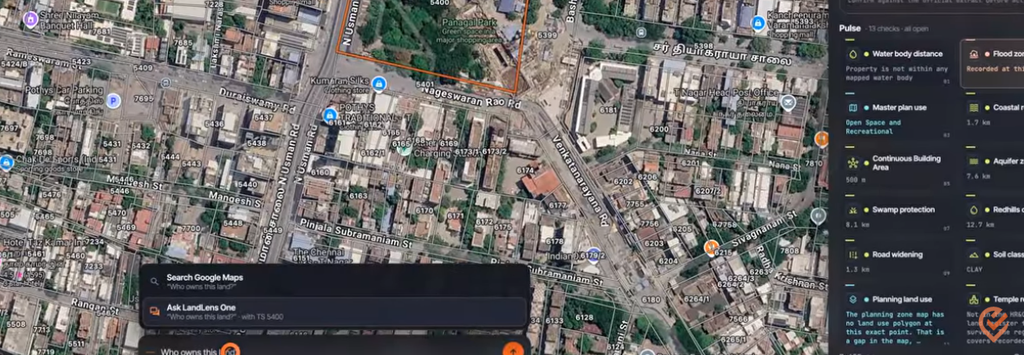
Map-based measurements are useful for preliminary assessment but should not replace official measurements or a professional boundary survey where precise dimensions are required.
Connect Property Search with LandLens One
As explained in the above paragraph, you can send a property-related question to LandLens One with the selected plot already attached. This helps in moving forward from identifying a parcel to investigating its records and potential concerns.
Why This Integration Matters
By connecting property search, satellite imagery, survey mapping and available land records, LandLens aims to make preliminary property research more convenient.
For buyers, landowners and real estate professionals, the potential benefits include faster parcel identification, easier access to relevant records, improved spatial understanding and more focused preliminary risk screening.
Understanding the LandLens Credit System
To learn how to purchase LandLens credits, understand the available credit options and manage your balance for advanced property searches, refer to the LandLens by Verified.RealEstate guide. It provides further information about using the credit system to access LandLens’s property verification features
How Google Maps Integrates with LandLens to Deliver Property Information
Chrome browser extension connects Google Maps’ interface with LandLens’s property-data services.
- Extension integration: When you open Google Maps in Chrome, the LandLens extension adds its supported search tools and land-related features to the map interface.
- Property identification: When you search by patta, district, taluk, village or survey number, LandLens processes the search and identifies the relevant property using its available data.
- Data connection: LandLens retrieves relevant land information through its connected data sources and services; Google Maps itself does not fetch Patta, FMB or Chitta records from government databases.
- Display on the map: The extension presents supported property details and survey-boundary overlays within the Google Maps experience, including Google’s place card as described in the demonstration.
- Further analysis: You can access available verification checks or send the selected plot to LandLens One for further investigation.
In simple terms: Google Maps supplies the map interface, the Chrome extension connects it to LandLens, and LandLens supplies the property information and verification features.
Conclusion
🌝Google Maps is more than a navigation tool; it is a powerful platform for exploring locations through interactive maps, satellite imagery and geographic information.
🌝LandLens One is a powerful AI-driven property verification assistant that helps users analyse land records, investigate potential risks and make more informed property decisions.
When Google maps is integrated with LandLens one, it becomes a convenient starting point for locating properties, viewing available survey boundaries and accessing relevant land records within the same mapping interface
Final conclusions about ownership, boundaries, land-use restrictions and legal compliance must still be based on authoritative records and appropriate professional verification.