


Land records in Tamil Nadu involve four critical documents Patta, Chitta, TSLR, and A‑Register each serving distinct purposes in land administration. These documents collectively establish ownership, classification, revenue details, and usage status. This detailed guide covers definitions, comparisons, and stepwise online access.
1. What Is Patta?
Patta is the primary Record of Rights issued by the Tamil Nadu Revenue Department. It serves as legal proof of ownership and is essential during transactions such as sale, inheritance, or mortgage.
Key Features:
- Owner’s name
- Unique Patta number
- Survey & sub‑division numbers
- Location details: District, Taluk, Village
- Land extent (in acres/hectares)
- Land type: Nanjai (wet) or Punjai (dry)
- Revenue/tax assessment information
Issued By:
The Taluk Office under the jurisdiction of the Tahsildar.
Applicability:
Essential in rural and some municipal areas for:
- Ownership validation
- Legal resale and mortgage
- Land conversion procedures
2. What Is Chitta?
Chitta is a revenue document maintained by the Village Administrative Officer (VAO) that classifies land based on usage and type.
It specifies:
- Owner’s name
- Survey & subdivision details
- Land classification (wet/dry)
- Land use type (agricultural/residential)
- Nature of ownership (freehold, assigned, etc.)
Integration:
Merged with Patta in 2015 to form a unified Patta–Chitta extract for simplified record management.
3. What Is TSLR (Town Survey Land Register)?
TSLR is the urban counterpart of Patta, designed for towns and Gramatham lands under municipal or panchayat control.
TSLR Contains:
- Property owner’s name
- Town Survey number
- Ward and Block IDs
- Plot boundaries, area, and neighbors
- Type of ownership and building classification (e.g., residential/commercial)
Applicability:
Used in urban areas and panchayat-governed townships for:
- Regularizing urban plots
- Property documentation
4. What Is A-Register (Adangal)?
The A‑Register, or Adangal, is a field-level rural land record maintained by the VAO and focuses on cultivation and revenue.
A‑Register Includes:
- Cultivator name
- Survey & sub‑division numbers
- Crop and soil type
- Irrigation method (well, canal, etc.)
- Cultivated area and revenue details
- Encumbrance information
Applicability:
Vital for:
- Agricultural planning
- Crop insurance
- Farming-related loans
5. Key Differences at a Glance
| Feature | Patta / TSLR | Chitta | A‑Register |
| Purpose | Proof of Ownership | Land Classification | Cultivation + Revenue Details |
| Area | Rural (Patta) / Urban (TSLR) | Rural & Semi‑Urban | Rural Only |
| Includes Land Type | ✔ (Nanjai/Punjai) | ✔ | ✖ |
| Includes Cultivation Info | ✖ | ✖ | ✔ (crops, irrigation) |
| Helps with Transactions | ✔ | ✔ (classification proof) | ✖ (mostly administrative) |
| Issued By | GST/Tahsildar Office | Village Administrative Officer | Village Administrative Office |
6. Similarities Across The Documents
- Issued and managed by TN Revenue Department
- Accessible via the TN e‑Services portal (web & TamilNilam app)
- Essential for testing ownership, processing loans, resolving disputes, and mutations
- Contain survey numbers, extent, and either owner or cultivator name
7. Accessing Records: Step-by-Step Guide
Step 1: Start at TN e‑Services Portal
Visit the official portal: eservices.tn.gov.in
- View Patta & FMB/Chitta/TSLR Extract – for ownership/classification
- View A‑Register Extract – for agriculture/revenue details
- Verify Patta or Verify Poramboke Land – optional verification tools

(Source: portal home – eservices.tn)
Step 2: Select Area Type – Rural or Urban
- Rural → Patta–Chitta
- Urban → TSLR

(Source: portal home – eservices.tn)
Step 3: Fill in Property Details
- Rural (Patta/Chitta):
- District → Taluk → Village → Survey No. → Sub‑division
- Urban (TSLR):
- District → Taluk → Town → Ward → Block → Survey No. → Sub‑division
- For A‑Register: same as rural input
Step 4: Authenticate Access
- Input captcha
- Provide mobile number to receive OTP
- Submit

(Source: portal home – eservices.tn)
Step 5: View & Download
Once authenticated, the system displays a digitally signed extract:
- Patta/Chitta: ownership, type, extent, tax
- TSLR: plot plan, boundaries, urban classification
- A‑Register: crops, irrigation, encumbrances
Click Download or Print for records.
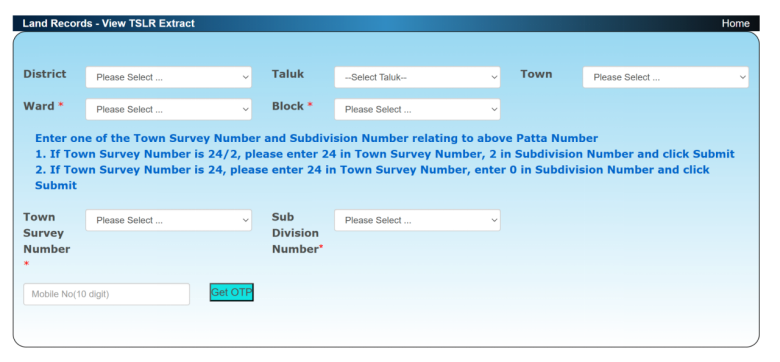
(Source: portal home – eservices.tn)
8. Practical Example Scenario
Scenario: You own Survey 12/3B, Subdivision 1 in Kayar village, Chengalpattu taluk, targeted for agricultural loan.
- Open portal → choose View Patta & FMB/Chitta Extract
- Fill rural location + survey details
- Verify with mobile OTP → download extract
- Repeat for A‑Register to get cultivation data (crop type, yield, irrigation)
- Submit both documents to the financial institution for loan processing
9. Why These Documents Matter
- Legal Ownership Proof: Mandatory for property deals, banks, and mortgages.
- Loan Eligibility: Banks often need Patta/Chitta, A‑Register, and an Encumbrance Certificate (EC).
- Classification & Conversion: Chitta helps verify land use and change approvals.
- Agricultural Insights: A‑Register gives crop, irrigation, and usage patterns.
- Urban Legitimacy: TSLR ensures boundaries, building types, and municipal data are transparent.
- Dispute Resolution: All documents serve as critical evidence in legal or succession cases.
10. Conclusion
Patta, Chitta, TSLR, and A‑Register work holistically to define land ownership, classification, and usage in Tamil Nadu. While Patta and TSLR establish legal ownership, Chitta provides classification context, and A‑Register offers revenue and cultivation history. Together, they ensure transparency and efficiency in land transactions, lending, and dispute resolution.