

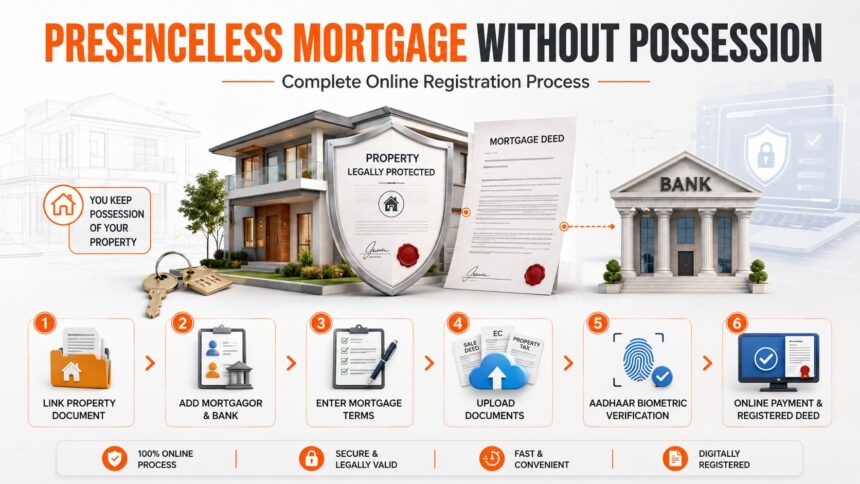
What Is a Mortgage Without Possession?
A mortgage without possession allows a property owner to offer a property as security for a loan while continuing to retain and use it. The lender receives a legal interest in the property, but physical possession is not transferred.
Tamil Nadu’s Presenceless Registration system allows eligible users to prepare and submit this mortgage deed online. The official user manual contains 27 pages covering the complete process.
1. Start the Online Application
Log in to the Tamil Nadu Registration Department portal using your username, password and captcha.
Go to:
Registration → Document Registration → Presenceless Registration
Select “Mortgage Without Possession”, read the prerequisites and click “Proceed.”
2. Link the Previous Property Document
The mortgage deed can be prepared either by linking an earlier registered document or by entering all the details manually.
To link a parent document, enter:
- Sub-Registrar Office
- Book number
- Document number
- Registration year
- Document type
If the document is available in the portal database, its party and property details are automatically displayed. Older records that have not been digitised may require manual entry.
Linking the correct parent document can reduce repeated data entry, but every copied detail must still be verified carefully.
3. Add the Mortgagor
The mortgagor is the person or organisation offering the property as security for the loan.
The portal permits three party types:
- Individual
- Company, firm or trust
- Government organisation
For an individual, enter the name, relationship details, Aadhaar information, complete address and contact details. Aadhaar is the default identification type.
For a company, firm or trust, the required information includes its name, TAN, address, contact details and email-delivery preference. Government organisations must provide their organisation name, address and contact details.
More than one mortgagor can be added. The application may be saved as a draft, and the same draft number will remain active until the index is created.
4. Add the Mortgagee Bank
The mortgagee is the bank or financial institution providing the loan.
Select the mortgagee bank from the portal’s “Government body” list and enter the required information.
If the mortgagee is also going to execute the deed, a representative must be appointed for the bank.
5. Add Representatives, Witnesses and Presenter
A representative may be added when a party is unavailable, is a minor or must legally act through another person.
Depending on the party type, the portal provides options such as:
- Special Power Agent
- General Power Agent
- Government Representative
- Company Representative
- Court-Appointed Curator
- Liquidator
Enter the representative’s identity proof, address, contact information and relationship details.
Two execution or identification witnesses must also be added using Aadhaar. The mortgagor is selected as the default presenter, but another eligible party may be chosen.
6. Enter or Copy the Property Details
The portal allows the following property types:
- Plot with building or individual house
- Vacant plot
- Flat
- Agricultural land
- Agricultural land with building
- Pathway
- Easement rights
- Special kind of building
When a previous document has been linked, select “Copy Property from Linked Document” and copy the relevant property. Otherwise, enter the property information manually.
The required information may include:
- Jurisdictional SRO and registration village
- Patta or other title number
- Survey number and subdivision
- Land classification
- Street details
- Total and mortgaged extent
- Market value
- Property boundaries
- Linear measurements
- Property remarks and items
A previous document number, Patta number or another accepted title number is mandatory. Multiple title or Patta numbers may be added where necessary.
7. Enter the Mortgage and Repayment Terms
Enter the mortgage amount and market value of the property.
Interest may be recorded either as a rate of interest or as a fixed interest amount. The portal also asks for the interest period and frequency of payment.
Repayment may be entered as:
- A fixed repayment period
- A specific repayment date
- Repayable on demand
If a repayment period is selected, enter the number of years, months and days.
The portal provides prefilled possession remarks, legal conditions and the reason for creating the mortgage. These terms must be read carefully. They may be edited, deleted or modified where necessary before confirmation.
8. Provide Supporting Details
If the mortgaged property contains a building, supporting information may include:
- TANGEDCO service details
- Metro Water details
- Property-tax details
The manual describes supporting-document upload at this stage as optional.
Enter the place of execution and select the relevant Sub-Registrar Office. Preview the document and verify the market value, system-calculated value, stamp duty, registration fee, computer fee and DW fee.
Click “Create Paperless Document.” The portal generates a Temporary Deed or TP number. Download and review the draft portal PDF.
9. Upload the Required Documents
Open “My Documents” and select “Upload Documents.”
Upload the required:
- Identification proofs
- Property image
- Reference documents
The upload screen permits a maximum attachment size of 50 MB and accepts only the file formats displayed on the portal.
Save the uploaded files and submit them only after checking that they open correctly and belong to the correct party or property.
10. Complete Photo and Aadhaar Biometric Verification
Return to:
Registration → Document Registration → My Documents
Select the mortgage document and click “Photo Biometric Capture.”
The listed parties must complete the required:
- Digital photograph
- Thumb or fingerprint capture
- Aadhaar validation
Important: Once Aadhaar validation is completed, the document cannot be changed. Therefore, names, property information, mortgage terms and uploaded records must be checked before biometric verification.
11. Pay and Submit the Mortgage Deed
After completing the uploads and biometric capture, print or download the portal document and check:
- All party details
- Property and survey information
- Mortgage and repayment terms
- Uploaded supporting documents
- Aadhaar-validated party details
- Stamp duty and registration charges
Click “Pay,” select the applicant type and complete the online payment.
After successful payment, the status changes to “Submitted Online.” The TP becomes non-editable and the document is sent to the Registration Department’s back office for processing.
Once the status changes to “Registered,” the registered mortgage deed can be downloaded from the portal.
Make the Online Registration Process Smoother
A mortgage deed involves property records, bank information, title documents, valuation, payment and biometric equipment. Even a small mismatch can delay submission or result in incorrect deed details.
Verified.RealEstate can assist buyers and property owners with document verification, property-record checks, banking coordination and the online registration process. Its experts can also support photo and biometric capture using the equipment required by the portal, helping the parties complete the transaction with fewer errors.
Final Checklist
Before submitting the mortgage deed, confirm that:
- The correct deed type is selected.
- The parent document belongs to the same property.
- Mortgagor and mortgagee details are accurate.
- Survey, Patta, extent and boundary details match the records.
- Mortgage amount, interest and repayment terms match the bank documents.
- Two witnesses have been added.
- All uploaded files are readable.
- The portal PDF has been checked before Aadhaar validation.
- Payment and registration status are confirmed.
- The registered deed is downloaded and safely stored.
Howdy! I’m at work browsing your blog from my new iphone!
Just wanted to say I love reading your blog and look forward to all your posts!
Carry on the outstanding work!
Thank you